Photography forum image of the month March 2011

Every month on our pho­tog­ra­phy forum mem­bers nom­i­nate images that they like. Then at the end of the month I choose an excel­lent image and talk about why it rocks. The photo I choose is not nec­es­sar­ily the best one of the month. I’ve come to real­ize it’s not really log­i­cal to pit images from totally dif­fer­ent gen­res against each other. That’s why there are cat­e­gories in photo con­tests. I just choose a photo that has extremely strong ele­ments that we can learn from.

Urban Eagle by Michaelaw

Urban Eagle by Michaelaw

This month’s choice is Urban Eagle by Michaelaw.

I chose this image for sev­eral reasons:

Story and com­po­si­tion — The title Urban Eagle tells it all and the awe­some back­ground imagery of a bridge and cranes make the story more com­pelling. Themes and sub­themes abound in shots like this and I really enjoy that. The eagle is well posi­tioned in this shot that had to be com­posed super-quickly. The back­ground ele­ments (bridge struc­ture and cranes) are also very well placed in the shot.

Degree of dif­fi­culty — timing/decisive moment — This is no easy shot to get. The tim­ing, (just look at the lovely frozen open-wings) the focus, and com­po­si­tion have to be very well synced and Michaelaw did an excel­lent job.

Sharp­ness — The bird’s feath­ers are really sharp and the eye looks quite sharp along with some lovely back­ground bokeh.

Colour and post pro­cess­ing — Both are well con­trolled to cre­ate this very strik­ing image with a lovely ‘cool’ colour palette that totally suits the image. If it were my shot I may have burned in the rear white wings a bit and dodged the face a wee bit but that’s it.

For all these rea­sons, this is my choice for image of the month. Since we all have opin­ions, some mem­bers may dis­agree with my choice. That’s cool but THIS thread is not the place for debate over my pick, NOR is it the place to fur­ther cri­tique the image. The pur­pose here is to sug­gest strong ele­ments in the photo that we may learn from.

Con­grats again Michaelaw for cap­tur­ing this won­der­ful scene!

Photo Editing On The Cheap by Glenn Euloth

I love pho­tog­ra­phy and as much as I try to get the image right in cam­era when I press the shut­ter release there are just some times when you need adjust some over­ex­posed bits or pos­si­bly do some cus­tom edit­ing to cre­ate a minia­ture look or selec­tive colour­ing. What­ever the rea­son might be there will be times when you need to edit your images. A full out copy of Pho­to­shop is more than $500. Even Pho­to­shop Ele­ments clocks in at $100 or so which is not super expen­sive but still, if I have an extra $100 I’m putting it towards a new lens or maybe that new tri­pod that I need.

In my last blog for Photography.ca I wrote about Picasa. Picasa does a won­der­ful job of basic photo edit­ing, how­ever, it just doesn’t cut it for any­thing really detailed. When I need more detailed edit­ing capa­bil­i­ties I use Gimp. Gimp is a won­der­ful piece of soft­ware avail­able for free use for Win­dows and Mac users as well as the orig­i­nal Unix plat­form. A com­pan­ion prod­uct called ufRAW, also free, allows Gimp to open and edit RAW image files and since I shoot almost exclu­sively in RAW for­mat it was a nec­es­sary add-on.

Gimp will do a lot more than I am capa­ble of doing and I have still used it to do some amaz­ing things. Like Pho­to­shop it allows you to edit images using mul­ti­ple lay­ers, has many dif­fer­ent fil­ters and scripts that can change the look of your images (or parts of it) and also pro­vides many dif­fer­ent tools to work on your images. In this blog post I’ll edit an image and pro­vide some screen shots to give you an idea of the capa­bil­i­ties of this won­der­ful piece of soft­ware, how­ever, to really learn how to use it visit the tuto­ri­als page on the Gimp site.

In order to give you the broad­est tour pos­si­ble I will take an orig­i­nal image where I’ve done a fair bit of work on the image and walk you through the edit­ing steps that I took to get it the way I wanted. Some of you out there may be much bet­ter at photo edit­ing and so you will undoubt­edly see areas where I am doing some­thing wrong. Please feel free to com­ment below so I can learn more about how to do this stuff properly.

Let’s start with this pho­to­graph of a but­ter­fly. Here’s the JPEG ver­sion cre­ated by export­ing from Picasa with default set­tings. All things con­sid­ered it’s not a hor­ri­ble shot of the but­ter­fly but the com­po­si­tion is kind of blah and the butterfly’s cam­ou­flage makes it dif­fi­cult to see. Let’s open it in Gimp to see what we can do with this bor­ing image.

Butterfly on Tree

First up, since it’s a RAW and I have ufRAW installed it auto­mat­i­cally opens in ufRAW for me.  Here I can make adjust­ments to the RAW image before jump­ing into the Gimp edi­tor proper.  For this image I’m going to make a few adjust­ments here so I end up in Gimp with the basics already com­pleted.  This is the gen­eral process for me.

  1. From Picasa I right click and select Open in Gimp.
  2. It auto­mat­i­cally opens in ufRAW because it’s a RAW image.
  3. I’ve clipped a few high­lights 0.1% and so I adjust the black lev­els a touch to elim­i­nate those.
  4. I then adjust the curves to boost the over­all expo­sure to where I like the image.
  5. Using the crop/rotate/size adjust tab I select a pleas­ing crop which puts the but­ter­fly on an inter­sec­tion of thirds and gives him space to “fly into”.  Note the grid lines allow me to do this easily.
  6. Click­ing OK trans­fers the image into Gimp for fur­ther edit­ing where I adjust the colour lev­els and pump up the sat­u­ra­tion on this one to give that but­ter­fly a lit­tle more life.
  7. Next, I’m going to do some selec­tive colour­ing to really make him stand out.  So, I’ll dupli­cate the layer so I now have two butterflies.
  8. Change the top layer to B&W and cre­ate a layer mask that I paint through to expose the butterfly.
  9. I switched to the colour layer and added a touch of unsharp mask to sharpen up the image.
  10. Last, to fin­ish it off, I add a cou­ple of bor­ders, first white, then black and save as a JPEG.


6a 

6b  6c 

8a 

8b  8c 

9a  9b 

10a  10b

That’s it!  Here’s the result:

Butterfly Edited

Liv­ing in Hal­i­fax, Nova Sco­tia, Glenn Euloth enjoys trav­el­ling on the pho­to­graphic jour­ney.  Visit www.euloth.com to join him on the trip or find him on our pho­tog­ra­phy forum under the nick­name of Iguanasan.

Vintage photo of the day March 17, 2011

Today’s image of the day is called Stairs of Mont­martre, Paris by the late mas­ter Hun­gar­ian pho­tog­ra­pher Andre Kertesz, and it was shot in 1925. Kertesz is one of my all time favorite pho­tog­ra­phers and more of his work will surely be fea­tured in the future.

Stairs of Montmartre, Paris - 1925 by Andre Kertesz

Stairs of Mont­martre, Paris — 1925 by Andre Kertesz

What makes this, and tons of other Kertesz images fan­tas­tic is the pre­cise and delib­er­ate com­po­si­tion. Kertesz was sim­ply a mas­ter at guid­ing your eye to inter­est­ing places in the pho­to­graph. The shapes of the shad­ows and the posi­tion of the rail­ings are both delight­ful to look at and they guide your eye per­fectly toward the humans in the photo.

Kertesz was also keenly aware of all planes of focus in an image and how they work together. The con­nec­tion between the fore­ground, midground and the back­ground ele­ments of this image helps to sug­gest a story as well as make the image graph­i­cally striking.

Graven Images – Ideas for Cemetery Photography by Kristen Smith

Strange as it may seem to some, I find ceme­ter­ies peace­ful places and I enjoy spend­ing time in them.  I also enjoy pho­tograph­ing them.  I’m mostly fas­ci­nated by the over­all aes­thetic of a ceme­tery, how the stones are placed, the ways they’ve shifted and changed over time, the carv­ings and motifs through the decades, dec­o­ra­tive arrange­ments like walls and gates; it all fas­ci­nates me and I do my best to cap­ture the essence of a grave­yard when­ever I shoot one.

Haunting the Obscure by Kristen Smith

Haunt­ing the Obscure by Kris­ten Smith

There are some gen­eral guide­lines you should fol­low when shoot­ing bur­ial grounds.  The first thing to remem­ber is to be respect­ful.  These places rep­re­sent lives and his­tory and often sor­row.  If there are mourn­ers or vis­i­tors present, give them space.  Don’t crash a ceremony.

Also don’t touch or move any­thing with respect to the graves them­selves.  If one is dam­aged or fallen over, leave it.  Some­times branches or other debris fall on mon­u­ments and I always leave those as well, unless it is pho­to­graph­i­cally in the way.  I also avoid climb­ing over any­thing I don’t have to like walls or gates. And I never remove any­thing from a gravesite and I can’t imag­ine doing so.

Angle of Repose by Kristen Smith

Angle of Repose by Kris­ten Smith

My main inter­est is in old ceme­ter­ies.  Luck­ily in New Eng­land we have the old­est Euro­pean ceme­ter­ies in the coun­try and I’m never short of sub­jects.  What­ever your par­tic­u­lar inter­est is, find ways to accen­tu­ate what you find inter­est­ing.  It might be par­tic­u­larly mov­ing epi­taphs, or art­work and com­mon dec­o­ra­tive motifs or maybe just find­ing stones of peo­ple with your name.  Per­son­ally I like to show the over­all struc­ture and char­ac­ter of a ceme­tery as well as high­light some of the old­est or most inter­est­ing head­stones.  Decay­ing stones are always ter­rific sub­jects; lichen, cracks, weath­er­ing and even out­right destruc­tion can make for really inter­est­ing images.

Harriet Obscured by Kristen Smith

Har­riet Obscured by Kris­ten Smith

I will admit that after years of shoot­ing in ceme­ter­ies it does get tougher to come up with orig­i­nal com­po­si­tions.  Some­times approach­ing a grave yard in a dif­fer­ent sea­son helps, like win­ter.  Some­times it means get­ting there at a cer­tain time of day so that carv­ings are brought up strongly with shad­ows. Some­times it means find­ing unusual per­spec­tives and includ­ing other things like walls and gates in my com­po­si­tions.  Fre­quently I use dif­fer­ent post-processing tech­niques to bring out what I want in a photo.  This doesn’t always mean black and white or sepia, but I do use them since they espe­cially suit the older bur­ial grounds I haunt.

Keeping Watch by Kristen Smith

Keep­ing Watch by Kris­ten Smith

So don’t be afraid to step into that ceme­tery near your house.  Explore it respect­fully, pho­to­graph it cre­atively and walk away with a sense of history.

Kris­ten Smith is a New Eng­land pho­tog­ra­pher whose ceme­tery work can be found in her Graven Images Gallery

Photographing Cityscapes — A City Mouse in Winter By Jacqueline A. Sheen

I love to pho­to­graph the city in win­ter. The light is like no other time of year since the sun is always low in the sky. Long shad­ows crawl across the snow cre­at­ing inter­est­ing lines. The light often has a sub­tle pink­ish glow that you only see in sum­mer at day­break. There is a clean crisp­ness to the air and the land­scape. The bare trees and snow cov­ered streets cre­ate a clean min­i­mal­ism you don’t have in summer.

I was out wan­der­ing about with my newly pur­chased 8mm fish­eye lens on a crisp Sun­day after­noon. The tem­per­a­ture was hov­er­ing at minus 20 C with the bit of wind chill. It was sunny and the snow was reflect­ing the light back on every sur­face. I was in the skate park with the idea I could try out some inter­est­ing exper­i­ments with the snow cov­ered skate domes. The new C Train over­pass also runs along the edge of the park, so I thought it would work well with the lens’s dis­tor­tion as well.

Urban Trek by Jacqueline A. Sheen

Urban Trek by Jacque­line A. Sheen

The prob­lems that a cityscape pho­tog­ra­pher faces in win­ter are not much dif­fer­ent than what a land­scape pho­tog­ra­pher would expe­ri­ence. Our ter­rain is gen­er­ally a bit smoother but it is equally as cold, so I always dress about the same as you would expect to dress if you were out in the moun­tains. I am usu­ally out for a few hours at a time, so I make sure I am pre­pared for the weather.  The advan­tage I have over the rugged land­scape pho­tog­ra­pher is that I can find a Star­bucks to warm up in pretty quickly when the going gets too cold!

If you are out in sub-zero tem­per­a­tures for extended peri­ods of time, you will have to con­sider how to care for your gear.  I usu­ally carry an extra bat­tery in my pocket but so far I have not had to use it. Recently, while out on the street on a crisp day of about minus 10 C, I noticed the sun shin­ing into one of our plus 15s that is acces­si­ble from the street. I thought it might make for an inter­est­ing shot from the inside and climbed up the stairs to go inside. Well– myself, (I wear glasses) the cam­era LCD screen and the lens fil­ter all fogged up as you might expect. After a few min­utes the fog­gi­ness cleared and I was able to get the shot. I am told that hav­ing a fil­ter on the front of your lens helps keep mois­ture off the lens itself so you may want to con­sider a UV fil­ter for that rea­son. Also when I come in from shoot­ing on a cold day,  I remove the mem­ory cards  from my cam­era,  pack up the cam­era and lenses  in the bag, then I zip it up tightly. I let every­thing return to room tem­per­a­ture for sev­eral hours before remov­ing the gear  from my bag. That way I avoid the prob­lem of con­den­sa­tion on my cam­era and lenses.  Hav­ing a well padded cam­era bag is use­ful for this reason.

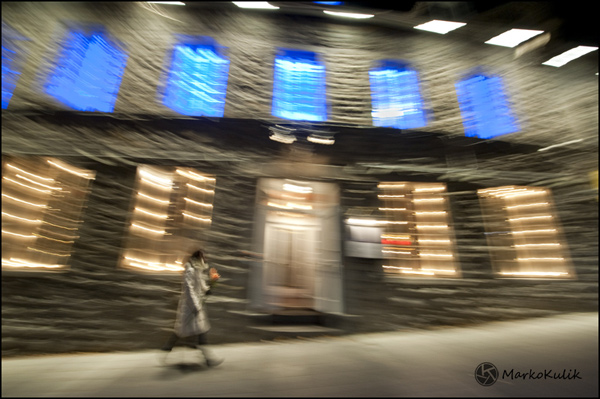
For this photo, which I call “Urban Trek”, I was lin­ing up the 8mm fish­eye lens to show off the cir­cle of street lights in the park. Some­one walked into my frame and I snapped the pic­ture.  The idea of the urban trekker appealed to me. Here we have an urban­ite fac­ing the harsh cold ele­ments sur­rounded by this stark bright land­scape. His dress and pos­ture fur­ther empha­size the cold tem­per­a­tures as he quickly walks to his destination.

Jacque­line A. Sheen is a pho­tog­ra­pher liv­ing in Cal­gary Alberta, Canada. You can check out more of her work at www.jasphoto.ca and she also goes by the han­dle JAS_Photo on our pho­tog­ra­phy forum.

Photography forum image of the month February 2011

Every month on our pho­tog­ra­phy forum mem­bers nom­i­nate images that they like. Then at the end of the month I choose an excel­lent image and talk about why it rocks. The photo I choose is not nec­es­sar­ily the best one of the month. I’ve come to real­ize it’s not really log­i­cal to pit images from totally dif­fer­ent gen­res against each other. That’s why there are cat­e­gories in photo con­tests. I just choose a photo that has extremely strong ele­ments that we can learn from.

Junk Yard Cat by Barefoot

Junk Yard Cat by Barefoot

This month’s choice is Junk Yard Cat by Barefoot

I chose this image for sev­eral reasons:

Mood — Light­ing — This image has a great mood due to the won­der­ful light­ing. The light­ing is on the low key side and it’s totally work­ing for me here. Even though the light­ing is low-keyish there’s still quite a bit of deli­cious shadow detail.

Good sug­ges­tion of a story — This is also related to the mood but it looks to me like this car is in an old garage or barn. The car is also way old with loads of rust but it still serves a pur­pose, it’s not dead yet. It serves as a poten­tial favourite rest­ing spot for the cat.

Sub­tlety — Mys­tery — Sur­prise — I love the fact that my eye did NOT go straight to the cat in this shot and this is due to the fact that the bright cir­cu­lar thing on top of the head­light at right is the first thing we look at. I love that. Had the cat been brighter, the shot would have been more about the cat and our eye would have gone straight for the cat. This way, we get a bet­ter sur­prise when we notice the cat.

Com­po­si­tion — I dig the repeat­ing cir­cles and lines in this image as well as the point of view from which the image was taken.

For all these rea­sons, this is my choice for image of the month. Since we all have opin­ions, some mem­bers may dis­agree with my choice. That’s cool but THIS thread is not the place for debate over my pick, NOR is it the place to fur­ther cri­tique the image. The pur­pose here is to sug­gest strong ele­ments in the photo that we may learn from.

Con­grats again Bare­foot for see­ing and cap­tur­ing this won­der­ful scene!

Managing Photos with Picasa by Glenn Euloth

I am a geek and I have been a geek for a long time. ‚So, when I first started man­ag­ing my dig­i­tal images I never thought I could trust a piece of soft­ware to look after the files on my com­puter. ‚I would use Win­dows Explorer to copy the files off of my cam­era and into a folder on my hard drive. ‚If I wanted to edit an image I would make a copy first and then edit the copy. ‚It worked great but it was very time consuming.

I tried the Kodak soft­ware that came with my first point and shoot but it was very slow and clunky and didn‚„t come with a decent image edi­tor so I gave up on it and went back to copy­ing files in Windows.

Google bought Picasa from Ide­alab in 2004, branded it, and started giv­ing it away as a free down­load. ‚The Google fan-boy that I am I decided to give it a try and it was instant soft­ware love. ‚I don‚„t know how much of it was Ide­alab and how much of it was Google but I found Picasa to be a won­der­ful piece of soft­ware that did every­thing I needed in a slick, easy to use package.

First up was image import. ‚I no longer had to launch two explorer win­dows, cre­ate a folder and copy the files from my SD card to the new folder. ‚Instead, insert­ing the SD card into my lap­top auto­mat­i­cally launches a win­dow that asks me if I want to import the files into Picasa. ‚All I have to do is click OK. ‚Picasa looks after the copy process and deletes all the images off the SD card after con­firm­ing the copy so I‚„m ready to go shoot­ing again.

Next is the easy edit­ing tools. ‚Once the image is in Picasa I can quickly nav­i­gate to an image and per­form a num­ber of easy edits.

Picasa soft­ware — Click to enlarge

  1. Red-eye removal
  2. Sat­u­ra­tion and sharpening
  3. Con­vert to black and white or sepia
  4. Crop to any dimen­sion or aspect ratio
  5. Facial recog­ni­tion
  6. Straighten the image
  7. Tag and Geotag
  8. And much, much more…

Not only do the edit tools work eas­ily and quickly but Picasa auto­mat­i­cally cre­ates a backup copy of the image and per­forms the edits on the copy so if you make a mis­take or if you want a copy of the orig­i­nal you can always find it or revert back.

I ran into a bit of prob­lem orga­niz­ing my images ini­tially as I was not using Picasa so I had cre­ated a 2009 folder and in it I cre­ated Jan­u­ary, Feb­ru­ary, March, etc. ‚After I started using Picasa I had a very sim­ple way to upload images to Pica­s­aWeb for shar­ing with just a click of a but­ton, how­ever, it used the folder name as the album name on Pica­s­aWeb. ‚This became a prob­lem when I started upload­ing ‚“Jan­u­ary‚ images from 2010 as they got put in the same album on PicasaWeb.

To solve this prob­lem I devel­oped the fol­low­ing strat­egy: ‚At the begin­ning of the month I cre­ate a folder in Picasa with the for­mat YYYY-MM (Mon­th­name), so for exam­ple I have 2011-01 (Jan­u­ary), 2011-02 (Feb­ru­ary), etc. ‚This allows me to store and man­age the images by date with­out wor­ry­ing about dupli­cates and when I want my hol­i­day pho­tos I can eas­ily search for ‚“December‚.

If you are not sure how to man­age your pho­tos or if the soft­ware you are using is awk­ward and not work­ing well for you then I highly rec­om­mend you‚down­load and install it. ‚At the very least you should check out the‚video. ‚Come back next month and I‚„ll talk about advanced image edit­ing with­out hav­ing to spend a lot of money on expen­sive software.

Liv­ing in Hal­i­fax, Nova Sco­tia, Glenn Euloth enjoys trav­el­ling on the pho­to­graphic jour­ney. ‚Visit‚www.euloth.com to join him on the trip or find him on our pho­tog­ra­phy forum under the nick­name of Iguanasan.

Vintage photo of the day Feb. 15, 2011

The vin­tage photo of the day is Side­long Glance by French‚photographer‚Robert Dois­neau and was taken in 1948. Dois­neau is one of France’s most famous pho­tog­ra­phers and many of his images like Kiss by the Hotel de Ville are con­sid­ered iconic.

Sidelong Glance by Robert Doisneau - 1948

Side­long Glance by Robert Dois­neau — 1948

What makes this pho­to­graph so appeal­ing is the sense of story and sense of humour. The woman is look­ing at the art in the‚foreground painting‚but the man sees ‘art’ in a dif­fer­ent paint­ing off to the side. The model’s bare bot­tom in the paint­ing is the bright­est ele­ment in the image so our eye (as well as the man’s rov­ing eye) goes right to it. The point of view of the image, the fab­u­lous tim­ing, as well as the fact that the sub­jects seem unaware that they are being pho­tographed all add to this image’s appeal.

Three Basic Rules of Close-Up Photography by Kristen Smith

So you want to get close, huh? ‚Close-up pho­tog­ra­phy is mag­i­cal and can be done with almost any lens, even your nor­mal zoom lens (all of these shots were taken with the Zuiko Dig­i­tal 12-60mm zoom, not a macro lens). ‚Sure, seri­ous macro pho­tog­ra­phy requires spe­cial­ized equip­ment, but you can get good results right away using what you have if you remem­ber a few guidelines.

First ‚œ get close! ‚So many times I see ‚Ëœclose-up‚„ pic­tures that include way too much in the frame. ‚Like a flower image that shows other flow­ers, leaves, a fence, the dirt etc. ‚That‚„s not a close-up. ‚The rea­son good close-up and macro pho­tos are so mag­i­cal is that they show us a world we might not ordi­nar­ily notice. ‚Here‚„s what to do, find out how close your lens will focus and then try and stick to that as much as pos­si­ble. ‚My ZD 12-60mm lets me get a cou­ple inches from my sub­ject and does a good enough job that I can some­times leave my macro lens at home.


Ice Crys­tals by Kris­ten Smith

Sec­ond ‚œ iso­late! ‚Close-up pho­tographs are much more effec­tive when the sub­ject is clearly sep­a­rated from the rest of the scene. ‚You can do this in two ways, first by choos­ing a sub­ject that doesn‚„t have any­thing near enough to be in the frame with it. ‚So pick that flower or mush­room that doesn‚„t have any friends. The sec­ond way you can iso­late your sub­ject is by open­ing your lens to a large aper­ture. ‚Doing this lim­its your depth of field and cre­ates an out of focus back­ground also known as bokeh. ‚Of course sharp focus on your main sub­ject is crit­i­cal, so be care­ful. ‚Watch the shut­ter speeds and use a tri­pod if necessary.

Chicory Blos­som by Kris­ten Smith

Third ‚œ sur­prise! ‚Show me some­thing dif­fer­ent. ‚Oh gee, another flower pic­ture. ‚Yay. ‚How about a bug? ‚Yawn. ‚A leaf? ‚Zzzzz. ‚Sorry, I‚„m not really dump­ing on any of these things, but haven‚„t we all seen a mil­lion of them? ‚I‚„m just as guilty of it. ‚After a while they‚„re all the same and it takes an effort to bring some­thing dif­fer­ent to the world of close-up pho­tog­ra­phy. ‚Find it. ‚What­ever it takes, find some­thing unusual about an every­day object or some­thing you hardly ever see pho­tographed. ‚Try new angles, per­spec­tives, jux­ta­po­si­tions, play with depth of field, back­ground, color com­bi­na­tions; any­thing to help your image break free of sameness.

Bro­ken Cork by Kris­ten Smith

So that should get you started. ‚Get close, iso­late and sur­prise me! ‚Feel free to post com­ments with links to your best close-up pho­tos or share them on the‚forum.

My Web­site = www.wickeddarkphotography.com and I’m based in New Hamp­shire, USA

Photography forum image of the month January 2011

Every month on our pho­tog­ra­phy forum mem­bers nom­i­nate images that they like. Then at the end of the month I choose an excel­lent image and talk about why it rocks. The photo I choose is not nec­es­sar­ily the best one of the month. I’ve come to real­ize it’s not really log­i­cal to pit images from totally dif­fer­ent gen­res against each other. That’s why there are cat­e­gories in photo con­tests. I just choose a photo that has extremely strong ele­ments that we can learn from.

A snowy morning by Bambi

A snowy morn­ing by Bambi

This month’s choice is‚A snowy morn­ing by Bambi

I chose this image for sev­eral reasons:

Mood — This image has a won­der­ful mood and this mood is cre­ated by the falling snow, the snow cov­ered branches in the fore­ground against the darker toned trees in the midground and of course the fig­ure in the back­ground. A shal­lower depth of field with the sharpest ele­ments in the fore­ground might not have been the obvi­ous choice for many pho­tog­ra­phers, but it is rock­ing this image big-time! The shut­ter speed catch­ing the sus­pended snow is also help­ing the mood. The Black and white con­ver­sion is very well done, and it suits and enhances the other ele­ments con­tribut­ing to the over­all mood.

Com­po­si­tion — Very well done here! There are ‘lay­ers’ of inter­est­ing things for our eyes to look at start­ing from the fore­ground and con­tin­u­ing to the back­ground where the focal point (the per­son) is. Our eye is well guided through this win­tery ‘tunnel’.

Exposure/shutter speed — Both are well han­dled here. The shut­ter speed ‘freezes‚ ’ the falling snow here. A good expo­sure keeps the whites in check and offers up won­der­ful tonal­ity with a good range of tones. If I have 1 teeny nig­gle I might burn in the light­est branches at top right by maybe 5%.

For all these rea­sons, this is my choice for image of the month. Since we all have opin­ions, some mem­bers may dis­agree with my choice. That’s cool but THIS post is not the place for debate over my pick, NOR is it the place to fur­ther cri­tique the image. The pur­pose here is to sug­gest strong ele­ments in the photo that we may learn from.

Con­grats again Bambi for cap­tur­ing this gor­geous scene!

Photographing Cityscapes — A City Mouse Perspective by Jacqueline A. Sheen

I am a city mouse; there is no get­ting around it. Not for me get­ting up in the predawn hours to drive for hours out to coun­try vis­tas wait­ing for the per­fect sun­rise. No. My milieu is the city. I live uptown and love it here. I walk just about every­where I go. I encounter inter­est­ing char­ac­ters almost daily and the bus­tle of rush hour makes my heart flut­ter just a lit­tle. When I leave the city, upon return­ing, the moment I see the city sky­line in the dis­tance my heart races just a lit­tle with the feel­ing one gets when they know they will soon see an old love once again.

Calgary Cityscape by Jacqueline A. Sheen

Cal­gary Cityscape by Jacque­line A. Sheen

Cal­gary is not a big city although it suf­fers a bit from urban sprawl. It sits nicely on the prairies, where the Bow River runs through it. The CPR rail­way also runs through the down­town core. This is a vibrant, wealthy city, that was built on a ‚“can do‚ pio­neer spirit.

Calgary‚„s many sky­scrap­ers afford some won­der­ful sky­line pho­tog­ra­phy. Because the city core runs east to west along the core, some really won­der­ful late day pho­tos can be had from the west­ern side of down­town fac­ing east. The glass tow­ers lit­er­ally glow pink and gold. The down­town core itself is located near the riverbed in a bit of a val­ley, which makes for some awe­some van­tage points both at river level and from higher van­tage points.

When pho­tograph­ing the city, I walk every­where. It is not really much dif­fer­ent than land­scape pho­tog­ra­phy in that respect. To see, really see what you are look­ing at, you have to slow down. I try to pho­to­graph the city in a way that shows off its beauty but at the same time, shows it in a way that the com­mon com­muter may not notice in their race to get down­town. Look up. Did you notice the clas­sic art deco styling on that old build­ing? ‚Did you see those gar­goyles way high up on another?

Cal­gary is blessed in that the down­town core is vibrant and alive. There is an active arts com­mu­nity and there is much pub­lic and pri­vate funded art. The photo above shows a por­tion of a large sculp­ture that graces the side­walk in front of one of the ‚“Oil Tow­ers‚ down­town. It looks like a styl­ized dinosaur skele­ton, which makes sense as all the oil reserves come from ‚“dinosaur bones‚ so to speak. Although the own­ers of the sculp­ture may not like my use of it to frame a sky­scraper other than their own, when I saw the photo, the title came imme­di­ately to mind. ‚“This City was Built On Dinosaur Bones.‚

Jacque­line A. Sheen is a pho­tog­ra­pher liv­ing in Cal­gary Alberta, Canada. You can check out more of her work at www.jasphoto.ca and she also goes by the han­dle JAS_Photo on our pho­tog­ra­phy forum.

Photographing Architectural Abstracts by Lisa Couldwell

Liv­ing in the down­town core of a large city with some inter­est­ing glass tow­ers makes for great oppor­tu­ni­ties to shoot urban archi­tec­tural abstracts. The beauty of this type of pho­tog­ra­phy is that some­times unco­op­er­a­tive weather or light can make for some great oppor­tu­ni­ties to catch build­ing reflec­tions. So any day I feel the need to get out for a walk, I take my cam­era and head down­town to see what the tow­ers will offer up for opportunities.

I guess the most impor­tant aspect of shoot­ing these types of sub­jects is the abil­ity to look up, ver­ti­cal, side­ways, basi­cally any way that gives one a dif­fer­ent per­spec­tive. When shoot­ing, look for inter­est­ing shapes and reflec­tions off the glass win­dows of the tow­ers. This can be any­thing from the reflec­tions of the other parts of the build­ings them­selves, to reflec­tions of the sky or clouds, sun­light or other build­ings in the area.

Energy Plaza - Calgary, Alberta by Lisa Couldwell

Energy Plaza — Cal­gary, Alberta by Lisa Couldwell

If you see some­thing that catches your eye, try turn­ing your head, body in a way that might per­haps give you a dif­fer­ent per­spec­tive and if you see some­thing, get the cam­era ready. I usu­ally set my Pen­tax into auto-bracket mode because I like to have the option of an HDR shot to play around with when I get home. Put the cam­era to the eye and again turn the cam­era, side­ways, on an angle or basi­cally any way that inten­si­fies the abstract­ness of what you see through the lens. Take your time and don’t be afraid to take sev­eral ver­sions of the shot while mov­ing the cam­era and your body into dif­fer­ent angles as you never know what may work and what may not. When com­pos­ing the image in cam­era, I often com­pose lines to move on the diag­o­nal as this moves the eye through the photo and cre­ates a pleas­ing per­spec­tive. I look for sym­met­ri­cal and geo­met­ric shapes when I move and pho­to­graph. I will go across the street and try from a dif­fer­ent street cor­ner as well. The beauty of this kind of pho­tog­ra­phy is any­thing goes and you never know what you may end up with just by mov­ing either a few cen­time­ters or sev­eral feet. (Just as an FYI, some­times you may get has­sled from secu­rity peo­ple but in Canada as long as you are on a pub­lic side­walk and not on pri­vate prop­erty you have the right to con­tinue to photograph.)

In this image, I really was attracted to the V shaped angle of the build­ing, van­ish­ing per­spec­tive, sym­me­try, and the reflec­tions of the other win­dows and the clouds. I pointed the cam­era straight up and tried to angle it so it was per­fectly sym­met­ri­cal. I then auto­brack­eted 3 shots at expo­sures of +.5/0/-.5 stops, com­bined them into an HDR image in Pho­tomatix, con­verted to BW in Sil­ver Efex and minor touch ups in Light­room to really bring out the cloud detail.

Lisa Could­well is a pho­tog­ra­pher liv­ing in Cal­gary Alberta, Canada. You can check out more of her work in the Pen­tax Gallery, on flu­idr,‚and on Smug­mug. She also goes by the han­dle casil403 on our pho­tog­ra­phy forum.