
 LinkBack URL
 About LinkBacks
So, I shot in camera raw + jpeg lg... reviewing the jpeg files in Adobe Bridge - it says 72dpi.... WHAT????I thought I would be getting the 300dpi... can anyone help me understand this?

This is a discussion on 72dpi - resolution - resampling - dpi - ppi within the Digital photography forums, part of the Photography & Fine art photography category; So, I shot in camera raw + jpeg lg... reviewing the jpeg files in Adobe Bridge - it says 72dpi.... ...
 Senior Member
 72dpi - resolution - resampling - dpi - ppi
So, I shot in camera raw + jpeg lg... reviewing the jpeg files in Adobe Bridge - it says 72dpi.... WHAT????
 Senior Member
I think all jpeg files recorded by camera's are recorded in 72dpi. I think it is something you have to do in PP. My Pentax and my Sony record all the jpegs in 72dpi. Maybe I am wrong, but thats what my experiences have told me.
http://www.flickr.com/photos/28054853@N08/
Photography is more than just taking a picture and freezing the action, or leaving the shutter open. It is more than orchestrating the image with the stroke of a brush. Its the realization and explanation that reality is an isolated experience in which only a specific individual can comprehend during any given time period. - Your Truly!
Senior Member
This is a great question.
I tried the Raw+JPeg and couldn't get the Raw to upload and the JPeg was low dpi. Can't remember what, it was a while ago.
I've also notice that I have some images pop up at 240 dpi and others 300 dpi. And I haven't changed the settings on my camera for the last year (nor the computer - but then again, we do have two and I use both).
I'm curious to know...
Member
I dont mean to be rude ( and i could be wrong so correct me ) but dpi is only a measurement that tells a device how big to display or print something and does not mean anything!!!! since the only thing that matters is resolotion when you go to print it it will STILL print at 300 dpi ( or what ever your printer prints at ) its only a guideline so to speak for devices which doisint really matter anyway.
a image at 3600x2700 res and saying 72dpi on the exif will give you identical results to file with the same res saying 5000dpi becouse the printer recognizes that this "size guidline" is false and writes its own before printing
sorry for spelling using touch screen device
 Moderator
DPI De-mystified
Moderator
DPI De-mystified
According to Page 170 of the owner's manual you should get the following resolutions:
Now, if I understand this correctly, DPI is dots per inch and whether it's 300DPI or 72DPI will depend upon how big the resulting photo is when it is displayed or printed. If you print the photo on a 4x6 and you do not lose any of the pixels then you are going to get
4368 / 6 = 728 DPI horizontal resolution
2912 / 4 = 728 DPI vertical resolution
So you are at 728 DPI.
That same photo printed at 8 x 12 will get you
4368 / 12 = 364 DPI horizontal resolution
2912 / 8 = 364 DPI vertical resolution
This is 364 DPI.
Remember, no matter what we do the image only has 4368 horizontal dots and 2912 vertical dots. The more inches that it's spread across the smaller the DPI.
Computer screens are generally 72 DPI because that's the largest number of pixels they can fit into 1 inch worth of screen "real estate". Note that newer monitors can go higher (96 and 120) and you can see the DPI of your screen in the advanced display properties (in Windows).
To make a long story short, you might be seeing the display properties of your image showing 72 DPI because it's being displayed on your monitor which really has little to do with the DPI of the image since that is completely dependent upon how big it is when you print it.
Senior Member
Nice that I read these replies on Valentine's day so I can say Love you guys with out too much brow raising!
Thanks for all of the feedback! !!! ! Very,very helpful!
Senior Member
DPI is a screen and printing term. Dots per inch. It has nothing really to do with the images in your camera. Even the lowest can run at 300dpi at size and look good.
72 DPI = Screen Resolution
172 DPI = Newspaper images (highest quality papers) Keep in mind that most newspapers now have ink optimizers that cut down on the dpi on the plate so they use less ink. So newspapers can print 100 dpi on some plates and 172 on others. DPI is just a term for formatting images for internet use 72-120 DPI and formatting for printing.
200-300 dpi = most trade magazines
300 dpi = high quality printing
Also, if you have a printer capable of printing higher than 300 - you can't see the difference, even at 600 dpi. The only reason you would ever print at high DPI is large format imaging and only if you shooting with a FF camera.
Senior Member
Hey. Back to this thread again. So I'm looking into getting some printing done but was told that I had to send my images at 300 dpi.
Some of them, for some reason are 300 while others are at 240. These I got from looking up the image size on PS. I was told that to go from 240 up to 300 was a no no. That it does alter the image negatively. So how do I get my images to 300 from the camera. I don't understand why there is a difference.
My new blog as of Nov/10
http://katchickloski.wordpress.com/
Senior Member
Ok..and I just read this..does this make any sense?
"If you need to change the embedded DPI for some other reason, this can be done within photoshop and most other image editing programs. In Photoshop, the DPI can be changed by: Image>Image Size>Resolution (pixels/inch). Make sure to uncheck the "resample image" box at the bottom, otherwise the number of megapixels in your image will change (using interpolation).:"
My new blog as of Nov/10
http://katchickloski.wordpress.com/
Senior Member
Image size is simple math. For all intents and purposes, DPI (Dots per inch) and PPI (Pixels per inch) are equal. DPI refers to printer resolution and PPI to screen resolution. Therefore, if you have an image that measures 3000x2000 pixels (A 6mp image) it would yield a 300 DPI image (using the long dimension) 10 inches wide. Let's say however that you crop a third of the image in order to achieve the composition you want. You now have a 2000x1300 (roughly) image. If you wanted to print an 8x10, the greatest resolution you could acheive would be 200DPI; if you needed 300DPI, then you would have to limit the size to [about] 4x6.
As far as upsampling in Photoshop, it does work, but depending on the degree and the type of image (bright colours with lots of detail won't upsample as well as dark, less detailed images), it may introduce a degradation of quality.
 Posting Permissions



 Reply With Quote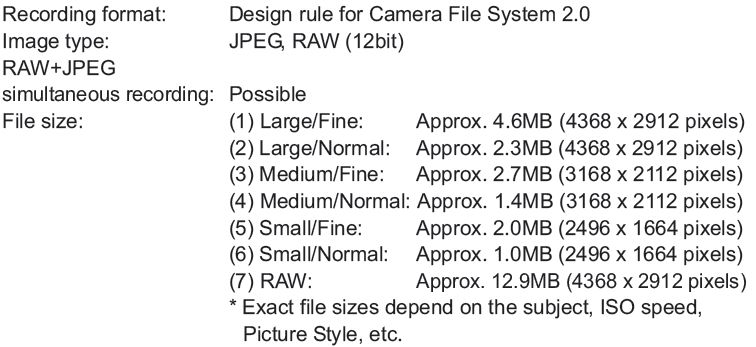
Bookmarks