Page 1 of 2 12 LastLast
Results 1 to 10 of 34

October - post processing assignment - Image by Ben H

This is a discussion on October - post processing assignment - Image by Ben H within the Post -processing forums, part of the Photo assignments category; Edited by Marko - Ok members there's yet a new assignment for October - Post processing. The assignment is to ...

Hybrid View

Previous Post Previous Post   Next Post Next Post
  1. #1
    tomorrowstreasures is offline Senior Member
    Join Date
    Aug 2008
    Location
    Midwest - USA
    Posts
    1,940
    My Photos
    Please ask before editing my photos

    Lightbulb

    Edited by Marko - Ok members there's yet a new assignment for October - Post processing.
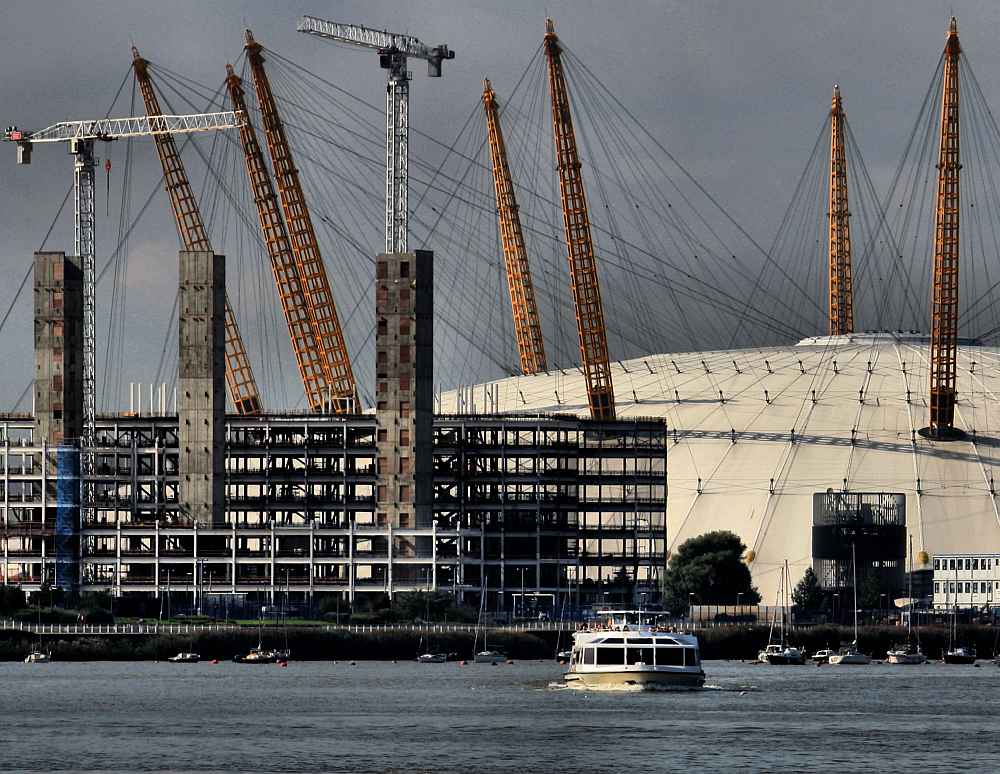
    The assignment is to fix up Ben H's image (in THIS thread) using the program of your choice. Since we all want to learn this, the only 'rule' is to describe what you did to the image to 'fix' it.

    For next month's assignment we'll post (or any member can take the lead) a few days before and ask for submissions for an image that we can all play with. Then we'll choose the image and people can describe their techniques.
    Thanks so much for this suggestion - it's a great one! Marko
    (FYI - the posts in this thread were merged to decrease confusion for this first post-processing assignment)

    Added - I see Ben H put up a Hi res version of his image here That's great - thx. Feel free to work on that hi res image, and then upload the 'fixed' version here. You can upload it at a low res version (less than 150K) or if it's more than 150 K the board will shrink it for you..or use a 3rd party link...all good.

    ------------------------------------------------------------------------------------------------------


    Originally Posted by marko View Post in Podcast Copy and pasted to here by
    TT,

    Marko said:
    But in no way am I an expert in the domain...post processing/retouching is something that I'm learning along with the rest of the members.
    marko


    TT's suggestion:
    This got me thinking. Since PP is such a new, but necessary playing field how about if we have an assignment thread in Post Processing/Photoshop, PSP, etc.. Each month, someone can volunteer to submit an image that we can all "tinker" with... record the steps we use, share the different out comes and learn new things along the way. I know that there are members who are way beyond the basics, seeing what they would do to an assigned image would be of great benefit. Not to mention the aspects of creativity. There is so much to learn here that having an assignment designated specifically to PP seems to me to be the next step in growing as an image maker.

    I'm into it but I'd like to have a few other people as well...

    many thx!
    Marko

    i'm in. we've done this on another forum & I always learn something new.

    I'd be willing to try as well, as this is an area where I feel I've got some ways to improve...

    I'm in. I'm more into After Effects and video effects, but some photo retouching is always fun

    Sounds good... the digital dark room is an area in which I am very weak!

    5 people is plenty enough for me and I will create a PP assignment subforum in the next day or so.

    Who wants to volunteer the first photo?

    many thanks! - Marko

    Maybe people could post a pic submission on a thread, and then everyone can choose which pic out of the submissions they most fancy working on by general concensus?

    Then that image becomes the first post of a new thread, where people can download the image (preferably at a good resolution to make the most of image processing) and then submit their version.

    That keeps it manageable, one source photo per thread, with all the variations of that image in the one thread.

    Edit: Ooh, I've got one I can submit, which has some potential for improvement, some potential for artistic interpretation, and a good few artifacts that people can try and fix... this should be quite interesting...

    Quote Originally Posted by Ben H View Post
    Maybe people could post a pic submission on a thread, and then everyone can choose which pic out of the submissions they most fancy working on by general concensus?

    Then that image becomes the first post of a new thread, where people can download the image (preferably at a good resolution to make the most of image processing) and then submit their version.

    That keeps it manageable, one source photo per thread, with all the variations of that image in the one thread.

    Edit: Ooh, I've got one I can submit, which has some potential for improvement, some potential for artistic interpretation, and a good few artifacts that people can try and fix... this should be quite interesting...
    I say go for it, Ben!

    Quote Originally Posted by Ben H View Post
    It's probably worth a few people submitting possible pics though, as people might just not find any particular image that inspiring to want to work on.

    Anyway, Marko's the boss of us here, so however he wants to run it is ultimately going to be how we do it, I guess..

    Here's a small version of the image I'd send in for this round - lots of room for improvement here:-


    And I'd probably also suggest that there should be no rules as such - an individual can do whatever post processing they want to get an image they are happy with. In short, anything goes. It will be interesting to see how creative some people can get
    But I think the worked on submission should include what steps you take to keep the integrity of a learning process for all.
    Last edited by Marko; 10-17-2008 at 10:41 AM.

  2. #2
    Ben H's Avatar
    Ben H is offline Senior Member
    Join Date
    Sep 2008
    Location
    UK
    Posts
    496

    Default

    It's probably worth a few people submitting possible pics though, as people might just not find any particular image that inspiring to want to work on.

    Anyway, Marko's the boss of us here, so however he wants to run it is ultimately going to be how we do it, I guess..

    Here's a small version of the image I'd send in for this round - lots of room for improvement here:-


    And I'd probably also suggest that there should be no rules as such - an individual can do whatever post processing they want to get an image they are happy with. In short, anything goes. It will be interesting to see how creative some people can get
    Last edited by Ben H; 10-13-2008 at 05:25 PM.

  3. #3
    Marko's Avatar
    Marko is offline Administrator
    Join Date
    May 2005
    Location
    Montreal, QC. Canada
    Posts
    14,870
    My Photos
    Please do NOT edit my photos
    Critiques
    Critique my photos anywhere in the forum

    Default

    Ok let's make this a monthly thing as well! Thanks for your image Ben H!
    Marko
    - Please connect with me further
    Photo tours of Montreal - Private photography courses
    - Join the new Photography.ca Facebook page
    - Follow me on Twitter http://twitter.com/markokulik
    - Follow me on Google+ https://plus.google.com/u/0/111159185852360398018/posts
    - Check out the photography podcast


    "You have to milk the cow quite a lot, and get plenty of milk to get a little cheese." Henri Cartier-Bresson from The Decisive Moment.

  4. #4
    Ben H's Avatar
    Ben H is offline Senior Member
    Join Date
    Sep 2008
    Location
    UK
    Posts
    496

    Default

    Excellent!

    Hang on, let me put up the high res image to download and work from - you'll get much better results... bear with me...

    Ok, the full image can be downloaded here:
    Download full image

    (Right click and save as to your computer)

  5. #5
    tomorrowstreasures is offline Senior Member
    Join Date
    Aug 2008
    Location
    Midwest - USA
    Posts
    1,940
    My Photos
    Please ask before editing my photos

    Default Psp x2

    steps used :
    straighten (level) used the water line/land line.

    crop - i tried to get rid of the burn marks, but took the easy way out

    add/remove noise: - despeckle feature 1 click.

    clarify - 10.0

    adjust: curves: 86>25

    smudge tool to remove 2 specks in the sky settings were:
    circle brush with slight feather on edge
    size:47
    hardness:50
    step:10
    density: 100
    thickness: 100
    opacity 40

    clone tool to remove 2-3 white specks in the water
    settings were:
    oval brush
    size 47
    hardness 50
    density 100
    thickness 35
    rotation 85
    opacity 94

    amount of time spent: 15 minutes

    Name:  2000and8.jpg
Views: 1097
Size:  107.8 KB

  6. #6
    Ben H's Avatar
    Ben H is offline Senior Member
    Join Date
    Sep 2008
    Location
    UK
    Posts
    496

    Default

    Nice! - gone for a quite dramatic look!

    I'm working on mine..

  7. #7
    Travis is offline Senior Member
    Join Date
    Mar 2008
    Location
    Huntsville Muskoka
    Posts
    678

    Default

    ran outta time.... but here is where i was going anyway....
    Attached Images Attached Images  

    ______________________

    Nikon D300, Nikkor 24-70 2.8 . Nikkor 70-200 2.8 . Nikkor 50mm 1.8 . Sigma 105mm 2.8 . Tokina 12-24 4 . SB-600 . 2xVivitar 285

  8. #8
    tomorrowstreasures is offline Senior Member
    Join Date
    Aug 2008
    Location
    Midwest - USA
    Posts
    1,940
    My Photos
    Please ask before editing my photos

    Default

    PK - I am so impressed with how you eliminated those nasty blotches! Way to go! (I cried uncle!)

    Fante - perhaps a wee correction on your horizon?


    Travis - you "embraced" the weird blotches on the far right, beautifully. They look like they actually belong, instead of a distraction!

  9. #9
    jmayoff's Avatar
    jmayoff is offline Junior Member
    Join Date
    Oct 2008
    Location
    Montreal, Quebec, Canada
    Posts
    23

    Default


    First I got rid of that thing in the foreground and got rid of some of the smoke at the back right (photoshop clone tool.) I sharpened (lab color and unsharp mask on lightness channel) and then converted to B&W all but some of the blue (I selected a color range.) I figured there really isn't any color worth preserving here except for that blue. I enhanced the blue (hue/saturation) and then increased the contrast (brightness/contrast.) I found the water wasn't dark enough so I selected it and used brightness contrast again to increase contrast.

  10. #10
    Ben H's Avatar
    Ben H is offline Senior Member
    Join Date
    Sep 2008
    Location
    UK
    Posts
    496

    Default

    I like the brightness of the dome in your pic, contrasts nicely against the water. Really nice.

    BTW - that smudgey thing isn't smoke, it's a plant or something close to the camera (and thus very defocused). Definitely an unwanted artifact, but a pain to remove...

Page 1 of 2 12 LastLast

Bookmarks

Posting Permissions

  • You may not post new threads
  • You may not post replies
  • You may not post attachments
  • You may not edit your posts
  •  

1 2 3 4 5 6 7 8 9 10 11 12 13 14 15 16 17 18 19 20 21 22 23 24 25 26 27 28 29 30 31 32 33 34 35 36