Loading

Lighting round faces – baldness – blemishes – Photography podcast #36

Photography podcast #36 focuses on thinking about how different types of light suit different types of faces. We talk about how both short lighting and side lighting are good for rounder faces. We also talk about blemishes and baldness.

Many thanks to Mark McCall for allowing me to use this image (and explanation below the image) clearly showing the the slimming effect of short lighting and the broadening effect of broad lighting on a model’s face.
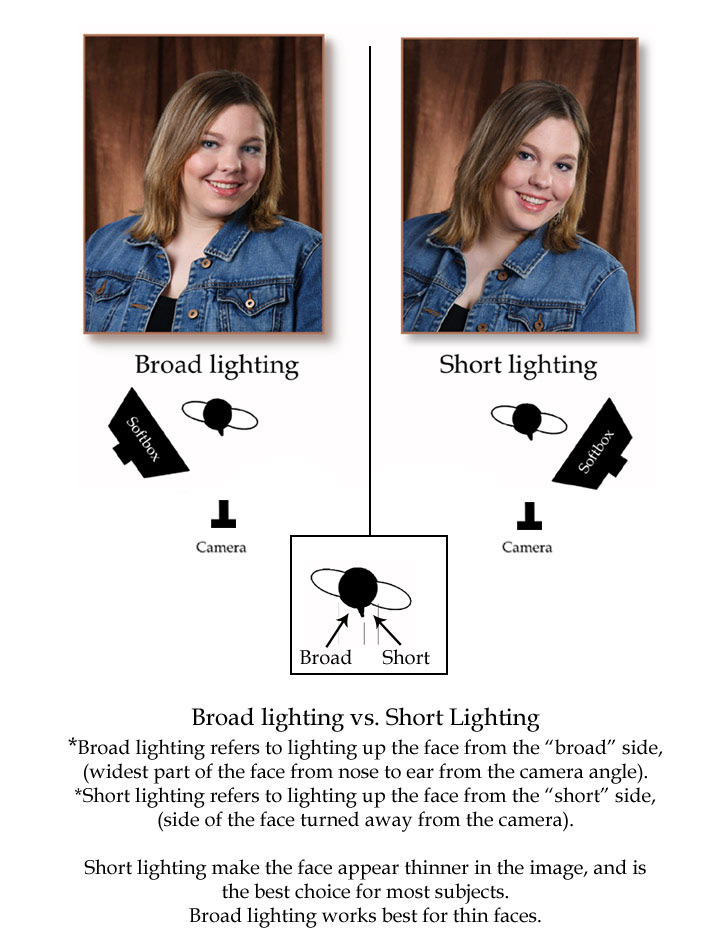
Broad Lighting vs. Short Lighting
Broad lighting refers to lighting up the face from the “broad” side, (widest part of the face from nose to ear from the camera angle).
Short lighting refers to lighting up the face from the “short” side, (side of the face turned away from the camera)

Short lighting makes the face appear thinner in the image, and is the best choice for most subjects. Broad lighting works best for thin faces.

Thanks as always for the comments by Yves Janse and Mikael. We LOVE comments and suggestions so please send more.

Wacom Tablet – anyone got tips?

So I just purchased a new Wacom tablet. I heard they rock and make photo editing so much easier. So after wasting 1/2 hour installing the fUC@**&%$en!!!!!! driver which did NOT easily install onto my Vista machine…here I go. My first instinct (to be fair after 10 minutes of use) is that it is NOT as easy to use as everyone raves.

There seems to be an unnatural disconnect in my brain between the size of the fixed nib on the pen and the brush size that you choose in photoshop. I guess i will need to play and even check out the tutorial on the disk. If anyone has any tips or pointers…I’m all ears. Thanks!

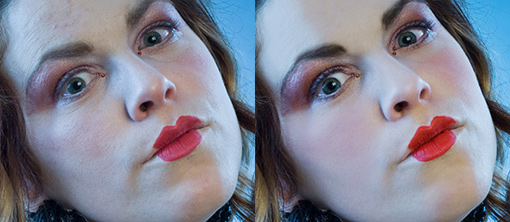
Added on Feb. 18, 2007‚ – This comment and picture by David Redding was really informative so I added it to this main post. Thanks David!

Here is a side by side of one of my touch up jobs. Now all of this could
have been done with a mouse, but I find I can be quite a bit more precise
with the stylist. for example, if you take a look at the forehead in the
retouched image, even at this web size you can make out skin details (good
luck doing that with a blur mask…I could never figure out how). I am
able to do the touch up and maintain skin texture by first doing a round
of Cloning and Healing at about 100-200% magnification. Once I have
removed all the rather large blemishes and skin imperfections I use the
Brush tool in CS3 with a soft edge, the Protect Texture option in the
brush tool kit selected and an opacity of around 20%. I then sample the
skin for colour and just paint on the skin correction.

the biggest difference between the mouse and the stylist when doing
editing jobs like this is with the mouse, when using the Brush tool, if
you set the Opacity to say 30% (or what ever setting) that is what you
get. But, with the stylist that same setting of 30% is just the maximum,
you can achieve less with the pressure of the stylist.

Like I said in my response to you posting, the stylist does take some
getting use to….How long have you been using a mouse for? But, once you
do get the settings to your liking and actually train your brain to use
the stylist instead of the mouse you will see how accurate you can be with
your editing.

Also, a graphics tablet can be a waste of money for some people. Really,
if all you really do in your editing is cropping, curves, colour balancing
(in RAW I hope) and sharpening, then a graphics tablet is really a waste
of money. But, on the other hand. If you do a fair amount of touching up
skin, dodging and burning or even custom graphics like painting on
patterns in you images, then a Tablet could be your saving grace.

Even at the end of the day the 'machine' keeps working

Now that I’ve resolved to take my camera with me more often, I’m likely to shoot more city scapes…like this one. This is just a small part of the enormous Shell refinery on the eastern part of the island Montreal. It was a quick shot since the light was fading fast. It was shot at ISO 1000 at 1/80 at F.2.8.

Shots like these tend to bother me somewhat. There is a sense of industry here. Things are happening. Machines are working. Machines are polluting.

……and yet the colours and the contrast seem intriguing. What do you think?

photograph of refinery

Even at the end of the day the ‘machine’ keeps working

Now that I’ve resolved to take my camera with me more often, I’m likely to shoot more city scapes…like this one. This is just a small part of the enormous Shell refinery on the eastern part of the island Montreal. It was a quick shot since the light was fading fast. It was shot at ISO 1000 at 1/80 at F.2.8.

Shots like these tend to bother me somewhat. There is a sense of industry here. Things are happening. Machines are working. Machines are polluting.

……and yet the colours and the contrast seem intriguing. What do you think?

photograph of refinery

Clamps, stands, arms and adapters – Photography podcast #35

Photography podcast #35 is all about using simple accessories to make your photo shoots go smoother. In particular, we discuss clamps, magic arms, flash adapters and light stands. All of the accessories can be used in multiple ways making them extremely versatile in a variety of shooting situations.

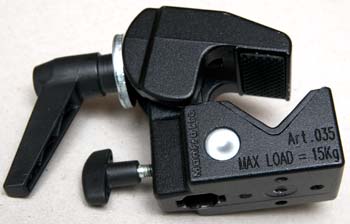
Manfrotto superclamp 035
Manfrotto Superclamp #035

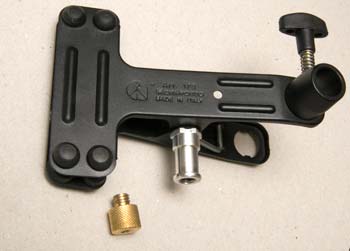
Manfrotto spring clamp 175F
Manfrotto spring clamp #175 with threaded adapter (088)

Manfrotto spring clamp with flash mount
Manfrotto spring clamp‚#175F with flash mount

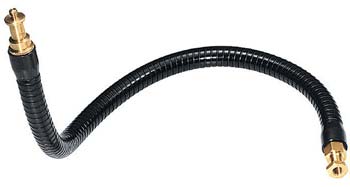
Manfrotto magic arm 237HD
Manfrotto flexible magic arm #237 HD

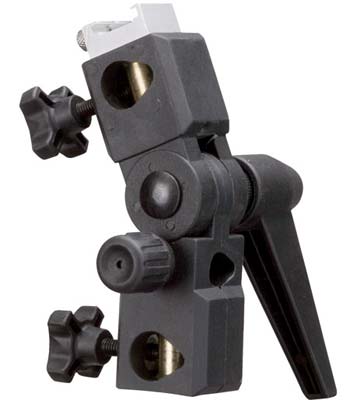
Opus umbrella mount OPL-SW0316

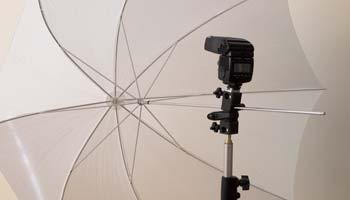
Opus umbrella mount on manfrotto master stand 004
Opus umbrella mount on manfrotto master stand #004

Superclamp 035 attached to magic arm attached to springclamp 175
Superclamp with arm attached to spring clamp

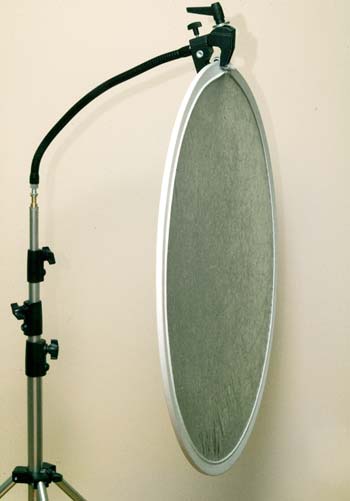
master light stand 004 with arm and superclamp holding a reflector
Extendible arm on manfrotto master stand #004
attached to superclamp holding a 32.5 inch reflector

Purchasing these items through these links helps support this site:

Manfrotto super clamp at B&H
Manfrotto super clamp at Amazon

Manfrotto spring clamp with flash shoe at B&H
Manfrotto spring clamp with flash shoe at Amazon

Manfrotto‚flexible arm‚at B&H
Manfrotto flexible arm at Amazon

Manfrotto‚master light stand‚at B&H
Manfrotto master light stand at Amazon

Photoflex (similar to‚Opus) umbrella flash mount‚at B&H
Photoflex (similar to Opus) umbrella flash mount at Amazon

You can download this photography podcast directly by clicking the preceding link or listen to it almost immediately with the embedded player below this set of images.

Photo of the week
This week, the photograph is by Arkady Renko and I comment in the podcast on why I think this photograph is fantastic.

Arkady Renko - Stranger

Thanks as always for the comments by‚Samirah,‚ Carlson Chu and Yves Janse. We LOVE comments and suggestions so please send more. Special thanks to Nico Pin who has helped make this blog more user friendly and look funkier.

Grab the light now – light waits for no one

Another resolution I am making this year (starting today) is not to tarry when I see great light. Great light doesn’t wait for you, great light doesn’t give a crap about your schedule – You wait for great light and when you see it you must grab it by its invisible balls.

Yesterday was an amazing example. I woke up and thick fog was everywhere – Everywhere!

I LOVE FOG.

For me, fog is great light. It evokes a rare special mood and feeling.
….but I’m a busy dude and work beckons me constantly so I checked the window periodically while I waited until I was ready to shoot. Guess what – once I was ready the fog had almost dissipated. Boy was I upset : (

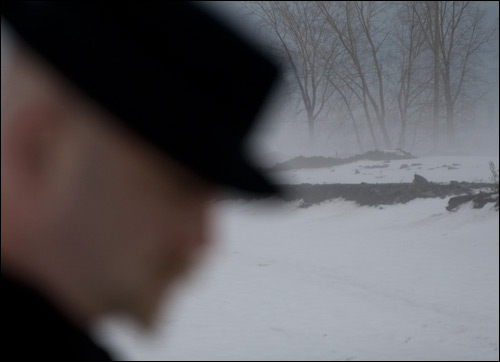
So as a last resort I got into my car and chased the fog until I found the best patch I could find. It was okay fog and I think this self-portrait is not bad.

Point is – Now I have think about what could have been instead of knowing that I was shooting at the best possible time…..

self portrait fog

Bring your camera everywhere – resolutions

It’s so obvious. Just bring your camera everywhere and you’ll take more pictures.
By taking more pictures, you’ll learn what works well and what doesn’t.
You won’t regret missing shots.
When you SEE that great light you’ll be there to record it.

So that’s one resolution that I’ll try to stick with this year. I intend to bring my camera everywhere. (I have a lot of gear so I’m only bringing 1 DSLR body, 1 lens and 1 flash)

Another resolution will be to do more reviews. I get a fair amount of email asking me what I use in terms of equipment or what I suggest. This coming year, I intend to share more of what I think are great photo products. From photo gear to software to wires to books – reviews are coming.

Happy new year everyone! All the best for 2008 – Keep on shooting!