Loading

Composition in Photography

We all hear of certain rules in photography that one may want to abide by. It is not to say these rules are set in stone but if followed, normally your photos stand out that much more.
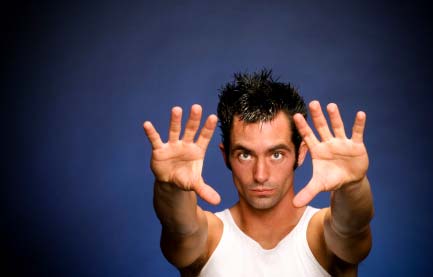

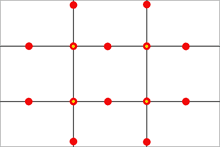
The ‘Rule of Thirds‘ is used regularly by most advanced photographers. The rule states that an image should be imagined as divided into nine equal parts (like a tick tack toe board) by two equally-spaced horizontal lines and two equally-spaced vertical lines, and that important compositional elements should be placed along these lines or their intersections. The shot above is a good example. Most newbies would have placed the model dead center in this image. The image works much better compositionally  with the model to to right of center on one of the lines with the yellow dot. Play with this ‘rule’ for yourself just to test it out.
Depth of Field (otherwise known as DOF), is the area from the foreground to the background within your photo that is in focus. A narrow DOF (F-2.0 or F-2.8 for example) will allow the main subject of your photo in be in focus while the background is blurred. A wider DOF allows one’s eyes to wander over the whole image as there are more details that are in focus.

Other ‘rules’ to consider include leading lines, framing, foreground interest and more.

Original link from our Photography forum
Composition in Photography

We all hear of certain rules in photography that one may want to abide by. It is not to say these rules are set in stone but if followed, normally your photos stand out that much more.


The ‘Rule of Thirds‘ is used regularly by most advanced photographers. The rule states that an image should be imagined as divided into nine equal parts (like a tick tack toe board) by two equally-spaced horizontal lines and two equally-spaced vertical lines, and that important compositional elements should be placed along these lines or their intersections. The shot above is a good example. Most newbies would have placed the model dead center in this image. The image works much better compositionally‚ with the model to to right of center on one of the lines with the yellow dot. Play with this ‘rule’ for yourself just to test it out.

Depth of Field (otherwise known as DOF), is the area from the foreground to the background within your photo that is in focus. A narrow DOF (F-2.0 or F-2.8 for example) will allow the main subject of your photo in be in focus while the background is blurred. A wider DOF allows one’s eyes to wander over the whole image as there are more details that are in focus.

Other ‘rules’ to consider include leading lines, framing, foreground interest and more.

Original link from our Photography forum

How to Create Sepia Tones

To add a certain nostalgic effect to photos, many fine art photographers‚ enjoy changing the colour of the photograph or actually toning the print to sepia. Using the darkroom to achieve your sepia effect is an option if you have the facilities available. If not, you have two other options – an in camera option on many DSLRs and good old photoshop.

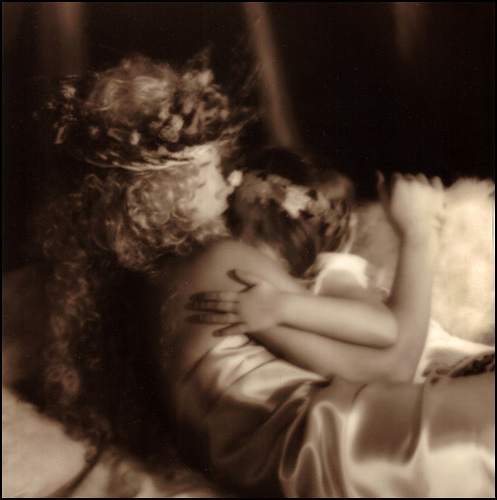
This image was printed in the darkroom and then toned in a sepia bath to get this rich brown colour.

Venus and Cupid by Marko Kulik - This image was printed in the darkroom and then toned in a sepia bath to get this rich brown colour.


Many digital cameras now offer you the option of taking the image in sepia (and other tones as well like blue, red, green etc.) This is quick and efficient for immediate results. It does have it’s limitations though, like losing all of the colour information in the image. This is why most photographers like to ‘play around’ with their photo in photoshop.

Photoshop not only allows the option of converting to sepia, but it further allows a whole range of brown/orange tones to choose from. Some artists prefer a more muted sepia, while others prefer it to appear more drastic. Either way, there is really a vast array of tones to choose from.

Whatever the method, just make sure of one thing – save an original copy of your photo just in case you decide that sepia wasn’t for you after all.

Here’s the link from our Photography forum
66 – Becoming a Photography Assistant

Photography podcast #66 discusses how to become a photographer’s assistant and this topic was suggested by new bulletin board member Ray. Thanks Ray!‚ Becoming a photography assistant is a great way to learn how photography is done in the ‘real world’ with real world pressures. It is a great way to decide if being a professional photographer is really what you want to do. This podcast suggests some good ways to get your foot in the door. If visitors reading this have additional ideas, leaving a comment would be most appreciated.

Links mentioned in this podcast:
May’s Nostalgia assignment on the Photography.ca forum
See and vote on April 2009′s member images
Photography jobs (different USA listings – some for photography assistants)

If you are still lurking on our forum,
feel free to join our friendly :) Photography forum

Thanks as always to everyone that sent comments by email about our last podcast. Although ALL comments are appreciated, commenting directly in this blog is preferred. Thanks as well to all the new members of the bulletin board.

If you are looking at this material on any other site except Photography.ca – Please hop on over to the Photography.ca blog and podcast and get this and other photography info directly from the source. I Subscribe with iTunes I Subscribe via RSS feed I Subscribe with Google Reader I Subscribe for free to the Photography podcast – Photography.ca and get all the posts/podcasts by Email
You can download this photography podcast directly by clicking the preceding link or listen to it almost immediately with the embedded player below.

Photography.ca winning member images from April 2009

For the past few months we have added a new feature on our photography bulletin board where the Admin on Photography.ca (Me, Marko), chooses 1 photo that he thinks is great and talks about the photo. The penguin photo below titled A zoo more by Siejones was my choice for this month. (check the previous link for the explanation).

We have lots of photographs being submitted each month on our forum for critiques, assignments or just to show the photo. Choosing Siejones’s photo as the ‹”winnerž took many hours of careful sifting. Given that it took so long to choose, I came across many many many close contenders. Seems like a waste of time just to include 1 photo so Ižd like to include 4 honourable mentions right here.

If you havenžt joined our forum I would encourage you to do so. We are an extremely friendly bunch that share and learn daily.

Herežs the winning photo by Siejones:

A zoo more by Siejones


Here are the 4 honourable mentions in no particular order:

A Mallard's Portrait by Michaelaw

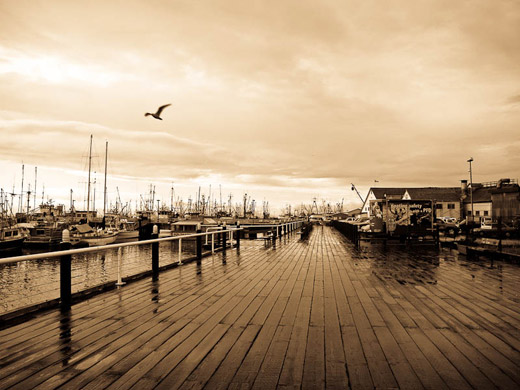
A Walk On Deck by Lovin

Cloud bank BW by Barefoot

Guitarist by AcadieLibre

Cameras and Manual Mode

Using Manual Mode on your camera… daunting to most newbie photographers, but a gem once you know how to use it.

Many newbie photographers steer clear away from Manual mode, and Opt for Automatic mode instead.‚ Full ‘Auto’ mode chooses everything from your ISO, to your shutter speed and aperture including whether or not a flash should be used. So really, it gives you a safety net to assure you can grab that shot without muffing it up. That said, the shot you end up with is based on the CAMERA’s choices not the photographer’s choices.


Manual mode however allows you to set both your aperture and shutter speed separately, without the camera automatically changing the other to suit. With this in mind, you can be more creative with your shots, and in turn, you can better understand how to get that perfect shot.

Manual mode seems to take more time then, right? Right.

But as a result, it forces you to THINK about your subject at hand, learn about light, shutter speed, depth of field and work at perfecting your shot and your craft.

PHOTOGRAPHY FORUM LINK