Photography podcast – photography blog – Photography.ca
77 – Neutral density filters – Graduated neutral density filters – Interview with D. Wiggett
January 29, 2010 on 6:36 pm | In Photography podcasts, Photography tips, podcasting | 13 CommentsPhotography podcast #77 features an interview with Darwin Wiggett where we talk about neutral density filters and graduated neutral density filters. Darwin explains why we use these filters and how to use these filters effectively. We discuss hard edge versus soft edge, physical versus software filters, we even talk about reverse graduated neutral density filters. For newbie photographers that have just hatched, Darwin goes over polarizing filters as well.

Left - Screw on neutral density filter. Right - The Cokin system
![]()

Left - Lake with no filter. Right - Lake with polarizer and-2-stop hard edge grad. Notice how much 'poppier' this shot is. The grad reduces the sky's intensity. The polarizer adds contrast to the clouds in the sky and intensifies its colour. It also removes the water's reflections thus saturating its colours. © Darwin Wiggett
![]()

Left - Tire with Polarizer and-2-stop-hard-grad. Right - Tire with a Polarizing filter plus a 2-stop-hard-edge grad and-a 5-stop solid-ND filter. Note the movement of the foreground brush and the softness in the clouds. This was achieved by using the solid ND filter to get a slow shutter speed. © Darwin Wiggett.
![]()

The effect of a polarizer on its own. Left - No polarizing filter. Right - The polarizing filter lets you see through the water by eliminating the water's reflectivity. With the reflections removed, the colour is much more saturated. © Darwin Wiggett
Links /resources mentioned in this podcast:
Seven Rules for Effectively Using a Polarizer
Filters, holders and vignetting: building a filter system that works with your lenses
The Terrific Triple Threat
Fields of Gold (or was that blue?) Three Camera Filters all Digital Photographers Should be Using
Filters for Outdoor Photography
January’s macro or close-up assignment on the Photography.ca forum
Cokin filters at B&H (Disclosure – Aff links – help support our site)
Singh-Ray filters at B&H
Lee filters at B&H
Please join the Photography.ca fan page on Facebook
My Facebook profile – Feel free to “friend” me – please just mention Photography.ca
My Twitter page – I will follow you if you follow me – Let’s connect – PLEASE email me and tell me who you are in case I don’t reciprocate because I think you are a spammer.
If you are still lurking on our forum,
feel free to join our friendly
Photography forum
Thanks to jacklabel, AcadieLibre and Mars observer who posted a blog comment about our last podcast. Thanks as always to everyone that sent comments by email about our last podcast. Although ALL comments are appreciated, commenting directly in this blog is preferred. Thanks as well to all the new members of the bulletin board.
If you are looking at this material on any other site except Photography.ca – Please hop on over to the Photography.ca blog and podcast and get this and other photography info directly from the source. I Subscribe with iTunes I Subscribe via RSS feed I Subscribe with Google Reader I Subscribe for free to the Photography podcast – Photography.ca and get all the posts/podcasts by Email
You can download this photography podcast directly by clicking the preceding link or listen to it almost immediately with the embedded player below.
Podcast: Play in new window | Download
Tags: GND, graduated neutral density filters, ND, neutral density filters, photography, polarizing filters
76 – Point and shoot cameras – Review of Canon G11
January 12, 2010 on 4:53 pm | In Photographs, Photography podcasts, Photography product reviews, Photography tips, podcasting | 2 CommentsPhotography podcast #76 talks about point and shoot cameras and reviews the Canon G11. We talk about the advantages and limitations of point and shoot cameras. We also talk about the most important reason for photographers to get a point and shoot camera and that reason is NOT quality. Finally I give a quick review of the Canon G11. I recommend this camera but I’m also brutal about its faults.

Image from Canon G11 - ISO 100, F-7.1, 1/100
Links /resources mentioned in this podcast:
Canon G11 at B&H (Disclosure – Aff links – helps support our site)
January’s macro or close-up assignment on the Photography.ca forum
Please join the Photography.ca fan page on Facebook
My Facebook profile – Feel free to “friend” me – please just mention Photography.ca
My Twitter page – I will follow you if you follow me – Let’s connect – PLEASE email me and tell me who you are in case I don’t reciprocate because I think you are a spammer.
If you are still lurking on our forum,
feel free to join our friendly
Photography forum
Thanks to Glenn Euloth (Iguanasan), Fortytwo, Crystalb, jacklabel, Bambi, JuiCe and Yisehaq who posted a blog comment about our last podcast. Thanks as always to everyone that sent comments by email about our last podcast. Although ALL comments are appreciated, commenting directly in this blog is preferred. Thanks as well to all the new members of the bulletin board.
If you are looking at this material on any other site except Photography.ca – Please hop on over to the Photography.ca blog and podcast and get this and other photography info directly from the source. I Subscribe with iTunes I Subscribe via RSS feed I Subscribe with Google Reader I Subscribe for free to the Photography podcast – Photography.ca and get all the posts/podcasts by Email
You can download this photography podcast directly by clicking the preceding link or listen to it almost immediately with the embedded player below.
Podcast: Play in new window | Download
75 – How to buy your first DSLR
December 11, 2009 on 3:46 pm | In Opinion-personal-rant, Photography podcasts, Photography tips, podcasting | 10 CommentsPhotography podcast #75 is geared toward photography enthusiasts that have not yet purchased their first DSLR camera. It encourages you to save money on your first DSLR camera body because you’ll need it for the lenses and accessories as you improve.

Links /resources mentioned in this podcast:
Canon 50D at B&H (Disclosure – Aff links – helps support our site)
Eos Rebel XSI (450D) at B&H
Nikon D3000 at B&H
Photography forum discussion on buying your first DSLR
December’s night photography assignment on the Photography.ca forum
Please join the Photography.ca fan page on Facebook
My Facebook profile – Feel free to “friend” me – please just mention Photography.ca
My Twitter page – I will follow you if you follow me – Let’s connect – PLEASE email me and tell me who you are in case I don’t reciprocate because I think you are a spammer.
If you are still lurking on our forum,
feel free to join our friendly
Photography forum
Thanks to Greg Nuspel, Benny, jacklabel, Jimmy Brown, Michael Van der Tol, Aaron Hockley, raiven, Antz, Dominic, Bambi, Fortytwo, Crystalb, Yisehaq and Kent Wilson who posted a blog comment about our last podcast. Thanks as always to everyone that sent comments by email about our last podcast. Although ALL comments are appreciated, commenting directly in this blog is preferred. Thanks as well to all the new members of the bulletin board.
If you are looking at this material on any other site except Photography.ca – Please hop on over to the Photography.ca blog and podcast and get this and other photography info directly from the source. I Subscribe with iTunes I Subscribe via RSS feed I Subscribe with Google Reader I Subscribe for free to the Photography podcast – Photography.ca and get all the posts/podcasts by Email
You can download this photography podcast directly by clicking the preceding link or listen to it almost immediately with the embedded player below.
Podcast: Play in new window | Download
Tags: Buying your first DSLR
74 – Hyperfocal distance – How to use the hyperfocal distance
November 17, 2009 on 3:54 pm | In Photography podcasts, Photography product reviews, Photography tips, podcasting | 22 CommentsPhotography podcast #74 is all about the hyperfocal distance and how to use it in landscape photography. In a nutshell, hyperfocal distance is the distance you focus at to get greater depth of field when focusing on an object in the distance. In this podcast we define what hyperfocal distance is and how to use it for both traditional (film) photography and in digital photography with new DSLRs and lenses. We also talk about when not to use the hyperfocal distance in landscape photography.

Hyperfocal distance chart from dofmaster.com – used by permission; thanks Don Fleming! This beautiful application from the dofmaster.com site clearly shows that by focusing at the hyperfocal distance you gain over 4 feet of sharpness toward the foreground when you use a 5omm lens at F-16 and focus at 27.1 feet instead of where the object actually is at 50 feet.. Try this test for yourself; shoot 1 shot the regular way and 1 shot using the hyperfocal distance. This application already lists the most common digital cameras and takes their crop factors into account.

Left image shot normally while right image was shot at the hyperfocal distance. Even at this small size you can see that the right shot shows a bit more sharpness in the midground while the background looks similar in both shots. The effects are more noticeable when you print at larger sizes.
Links /resources mentioned in this podcast:
Dofmaster’s awesome depth of field calculator that also calculates hyperfocal distance
Dofmaster’s depth of field calculator for free use with an iphone (need to connect to the Net – use this URL from an IPhone ONLY – NOT from your computer)
Dofmaster’s simulated depth of field calculator for free use with an Non-iphones (need to connect to the Net)
Dofmaster’s Itunes depth of field calculator App for $1.99 (No Internet connection required)
November’s ‘landscapes in portrait orientation’ assignment on the Photography.ca forum
Please join the Photography.ca fan page on Facebook
My Facebook profile – Feel free to “friend” me – please just mention Photography.ca
My Twitter page – I will follow you if you follow me – Let’s connect – PLEASE email me and tell me who you are in case I don’t reciprocate because I think you are a spammer.
If you are still lurking on our forum,
feel free to join our friendly
Photography forum
Thanks to Kat, Glenn Euloth (Iguanasan), Bambi and Alex Maxim who posted a blog comment about our last podcast. Thanks as always to everyone that sent comments by email about our last podcast. Although ALL comments are appreciated, commenting directly in this blog is preferred. Thanks as well to all the new members of the bulletin board.
If you are looking at this material on any other site except Photography.ca – Please hop on over to the Photography.ca blog and podcast and get this and other photography info directly from the source. I Subscribe with iTunes I Subscribe via RSS feed I Subscribe with Google Reader I Subscribe for free to the Photography podcast – Photography.ca and get all the posts/podcasts by Email
You can download this photography podcast directly by clicking the preceding link or listen to it almost immediately with the embedded player below.
Podcast: Play in new window | Download
73 – Landscape photography tips – improving boring landscapes
October 23, 2009 on 2:29 pm | In Photographs, Photography podcasts, Photography tips, podcasting | 4 CommentsPhotography podcast #73 is all about landscape photography and how to improve your landscape photography. Many newbies and advanced amateurs consistently wonder if their landscape photography is any good. This podcast offers up a fair pile of tips to help get your landscape photography to the next level. Some of the things we talk about include; lighting for landscapes, the background and the foreground, what makes landscapes interesting, exposure and landscape photography, filters in landscape photography, tripods and post production.

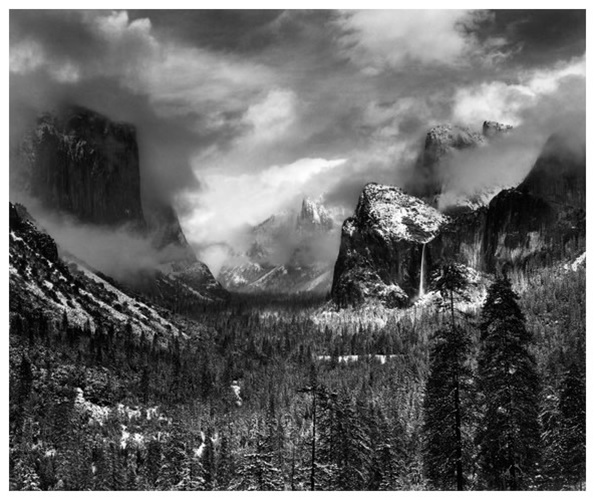
Yosemite Valley, Winter 1940 by Ansel Adams
Note the points of interest in the foreground, background and midground, note the full range of tones and note how skillfully our eyes are being guided. This is no accident, it’s the result of great planning (the light) execution (exposure/filters/composition) and finishing touches (darkroom post-processing – done these days using a graphics program).


Fishing spot by Kat
Kat has a great handle on the range of tones, exposure and composition here and I really like this shot. It’s missing just a little something of interest IMO to get the big “WOW!” Perhaps if a large rock was dropped in the midground with moving ripples that would have done it…. this shot is so close it just needs a hint of something “extra”.


Fly with me…across Australia (part of a series) by Mad Aussie
This one contains the “Wow!” factor for me. Great colour, range of tones, exposure and composition. Note the reflections in the foreground, the rocks in the midground and that awesome sky in the background. I love how the midground and background seem to meld into one another.
Links /resources mentioned in this podcast:
The Ansel Adams gallery
Darwin Wiggett – Fabulous landscapes
Rule of thirds podcast
Histogram podcast
October’s “Scary-Mysterious-Halloween” assignment on the Photography.ca forum
Please join the Photography.ca fan page on Facebook
My Facebook profile – Feel free to “friend” me
My Twitter page – I will follow you if you follow me (Hey that’s a Gabriel lyric) – Let’s connect
If you are still lurking on our forum,
feel free to join our friendly
Photography forum
Thanks to jacklabel, and Kent Wilson who posted a blog comment about our last podcast. Thanks as always to everyone that sent comments by email about our last podcast. Although ALL comments are appreciated, commenting directly in this blog is preferred. Thanks as well to all the new members of the bulletin board.
If you are looking at this material on any other site except Photography.ca – Please hop on over to the Photography.ca blog and podcast and get this and other photography info directly from the source. I Subscribe with iTunes I Subscribe via RSS feed I Subscribe with Google Reader I Subscribe for free to the Photography podcast – Photography.ca and get all the posts/podcasts by Email
You can download this photography podcast directly by clicking the preceding link or listen to it almost immediately with the embedded player below.
Podcast: Play in new window | Download

72 – Exposure compensation
September 22, 2009 on 4:41 pm | In Photography podcasts, Photography tips, podcasting | 6 CommentsPhotography podcast #72 discusses how to use exposure compensation. It’s a fairly simple concept that just means deviating away from (or compensating against) the camera meter’s recommended exposure to make the image brighter or darker. We also talk about which camera modes you’ll want to use exposure compensation with, and I discuss why program mode sucks and should be avoided. Even though exposure compensation in photography is an easy concept, I discuss the reasoning behind it, why I frequently use it and why you should too.

The exposure compensation dial on the Canon G10
Links /resources mentioned in this podcast:
Original suggestion thread from our forum – Thanks Iggy!
September’s “New Beginnings” assignment on the Photography.ca forum
Please join the Photography.ca fan page on Facebook
My Facebook profile – Feel free to “friend” me
My Twitter page – I will follow you if you follow me (Hey that’s a Gabriel lyric) – Let’s connect
If you are still lurking on our forum,
feel free to join our friendly
Photography forum
Thanks to Nijip, jacklabel, jabber and Tom Restis who posted a blog comment about our last podcast. Thanks as always to everyone that sent comments by email about our last podcast. Although ALL comments are appreciated, commenting directly in this blog is preferred. Thanks as well to all the new members of the bulletin board.
If you are looking at this material on any other site except Photography.ca – Please hop on over to the Photography.ca blog and podcast and get this and other photography info directly from the source. I Subscribe with iTunes I Subscribe via RSS feed I Subscribe with Google Reader I Subscribe for free to the Photography podcast – Photography.ca and get all the posts/podcasts by Email
You can download this photography podcast directly by clicking the preceding link or listen to it almost immediately with the embedded player below.
Podcast: Play in new window | Download
Tags: exposure compensation, photography
71 – Portable flash
August 31, 2009 on 5:03 pm | In Photography podcasts, Photography tips, podcasting | 10 CommentsPhotography podcast #71 discusses the principles of using a portable, external flash. We talk about how flash works, the different types of portable flash, on camera and off camera flash, using a portable flash as a main light source versus a fill light, bouncing the flash, sync speeds and more.

Depth of field guide
Links /resources mentioned in this podcast:
Podcast #33 – Studio lighting for beginners
Podcast #47 – Flash sync speeds
PocketWizard from B&H
Peanut slaves from B&H
August’s “Water” assignment on the Photography.ca forum
If you are still lurking on our forum,
feel free to join our friendly
Photography forum
Thanks as always to everyone that sent comments by email about our last podcast. Although ALL comments are appreciated, commenting directly in this blog is preferred. Thanks as well to all the new members of the bulletin board.
If you are looking at this material on any other site except Photography.ca – Please hop on over to the Photography.ca blog and podcast and get this and other photography info directly from the source. I Subscribe with iTunes I Subscribe via RSS feed I Subscribe with Google Reader I Subscribe for free to the Photography podcast – Photography.ca and get all the posts/podcasts by Email
You can download this photography podcast directly by clicking the preceding link or listen to it almost immediately with the embedded player below.
Podcast: Play in new window | Download

70 – Getting sharper images – common problems
August 5, 2009 on 8:06 am | In Photography podcasts, Photography tips, podcasting | 6 CommentsPhotography podcast #70 discusses why sometimes our photographs do not appear sharp enough. We touch on several important factors that all compromise image sharpness. For newbies in particular, we also mention the depth of field guide which clearly tells the photographer the zone of sharp focus (in feet and inches or centimeters and meters depending on the guide) to expect with a given aperture and lens.

Depth of field guide
Links /resources mentioned in this podcast:
Portable depth of field guide from B&H
Free depth of field table for most digital cameras
August’s “Water” assignment on the Photography.ca forum
If you are still lurking on our forum,
feel free to join our friendly
Photography forum
Thanks as always to everyone that sent comments by email about our last podcast. Although ALL comments are appreciated, commenting directly in this blog is preferred. Thanks as well to all the new members of the bulletin board.
If you are looking at this material on any other site except Photography.ca – Please hop on over to the Photography.ca blog and podcast and get this and other photography info directly from the source. I Subscribe with iTunes I Subscribe via RSS feed I Subscribe with Google Reader I Subscribe for free to the Photography podcast – Photography.ca and get all the posts/podcasts by Email
You can download this photography podcast directly by clicking the preceding link or listen to it almost immediately with the embedded player below.
Podcast: Play in new window | Download
Tags: getting better sharpness, sharpness, sharpness problems
69 – Street photography tips
July 11, 2009 on 7:05 am | In Photography podcasts, Photography tips, podcasting | 8 CommentsPhotography podcast #69 discusses street photography; what gear to use, what to shoot, how to shoot, should I ask the subject’s permission before I shoot etc. This topic was suggested by TJD of our photography forum, so many thanks TJD! One thing I forgot to mention during the podcast concerns model releases. If you never plan to sell the image, in Canada and the U.S. at least, you probably (I’m not a lawyer so this advice is worth what you paid for it as opposed to 2oo bucks an hour) don’t need one. If you plan to sell the images you shoot, then it makes good sense to bring a release form with you.

Rue Mouffetard, Paris and Behind the Gare St. Lazare, Paris by Henri Cartier-Bresson
Links /resources mentioned in this podcast:
Henri Cartier-Bresson
Robert Doisneau
July’s Heat” assignment on the Photography.ca forum
If you are still lurking on our forum,
feel free to join our friendly
Photography forum
Thanks as always to everyone that sent comments by email about our last podcast. Although ALL comments are appreciated, commenting directly in this blog is preferred. Thanks as well to all the new members of the bulletin board.
If you are looking at this material on any other site except Photography.ca – Please hop on over to the Photography.ca blog and podcast and get this and other photography info directly from the source. I Subscribe with iTunes I Subscribe via RSS feed I Subscribe with Google Reader I Subscribe for free to the Photography podcast – Photography.ca and get all the posts/podcasts by Email
You can download this photography podcast directly by clicking the preceding link or listen to it almost immediately with the embedded player below.
Podcast: Play in new window | Download
68 – Creating a photography portfolio
June 26, 2009 on 3:48 pm | In Photography podcasts, Photography tips, podcasting | No CommentsPhotography podcast #68 discusses how to to prepare a portfolio for clients, agencies galleries etc. Even though we are in the digital age, when it comes to presentation, nothing beats a beautifully printed photograph. This podcast shares some tips and tricks on putting together a great portfolio.

Links /resources mentioned in this podcast:
Presenting photography to galleries – Podcast #53
June’s low shooting angle assignment on the Photography.ca forum
If you are still lurking on our forum,
feel free to join our friendly
Photography forum
Thanks as always to everyone that sent comments by email about our last podcast. Although ALL comments are appreciated, commenting directly in this blog is preferred. Thanks as well to all the new members of the bulletin board.
If you are looking at this material on any other site except Photography.ca – Please hop on over to the Photography.ca blog and podcast and get this and other photography info directly from the source. I Subscribe with iTunes I Subscribe via RSS feed I Subscribe with Google Reader I Subscribe for free to the Photography podcast – Photography.ca and get all the posts/podcasts by Email
You can download this photography podcast directly by clicking the preceding link or listen to it almost immediately with the embedded player below.
Podcast: Play in new window | Download
Tags: photography portfolio, portfolios
67 – Orton Imagery – The Orton Effect – Interview with Michael Orton and Darwin Wiggett
June 3, 2009 on 11:52 am | In Photographs, Photography podcasts, Photography tips, podcasting | 16 CommentsPhotography podcast #67 discusses how to use Orton Imagery (AKA the Orton effect or the Orton Technique) to give your photographs an ethereal/painterly feel. This technique was invented by Michael Orton in the mid 1980’s using 2 pieces of overexposed slide film sandwiched together. The principles of this technique can also be used in graphics programs like Photoshop to achieve a similar effect. This podcast contains 2 interviews; one with Michael Orton discussing the technique’s history, and one with Darwin Wiggett, discussing his method for creating Orton Imagery using Photoshop and other graphics programs. Darwin’s step-by-step is outlined below and his Photoshop action is also included. Thanks a ton Michael and Darwin!!
Here’s how to create Orton Imagery Using Photoshop. Portion reprinted from from Orton Imagery – A “How to” guide for Photographers by Darwin Wiggett. Thanks to Nature Photographers online magazine for allowing me to reprint this.
Digital Technique to Create Orton Images
Here, there are many ways to simulate an Orton slide sandwich. You can do it the same way as outlined above for slides overexposing two separate images and then in the computer stacking the images together in software and blending them. Personally, I prefer to take my existing digitized photos (either from film scans or digital camera files) and running them through the process below to see if they work as “Orton Images”.
Here is the step-by-step recipe for making Orton images in Photoshop:
- Open any image you wish to try the technique on. Make a duplicate of the image (Image>Duplicate). Close the original image.
- Lighten the image as follows: Image>Apply Image… then in the dialog box that comes up change the bending mode to “Screen” and the Opacity to 100%. This will give you an appropriately overexposed image.
- Duplicate this overexposed image (Image>Duplicate).
- Blur this second image (Filter>Blur>Gaussian Blur… and in the dialog box use a Radius setting of 15 to 50 pixels – the higher the pixel setting the blurrier the photo and the more ‘painterly’ the image… but you can go too far!). Experiment with different settings, for my tastes and for the size of my digital files (50-100 megabytes) a radius of about 25 pixels works perfect.
- Now select the move tool from the Photoshop tool bar (or just press “v” on your keyboard for quicker access to the move tool). Hold down the “shift” key and use your mouse to drag and drop the blurry image onto the sharp one (don’t let go of the shift key until after you release the mouse button or the images won’t be in perfect alignment).
- Bring up the layers palette in Photoshop (F7 is the keyboard shortcut). Under the word “Layers” in the layers palette will be a menu box of blending modes. Change the blending mode from “normal” to “multiply”.
- Now “flatten’ the two layers by pressing “CTRL+E” or by clicking on the sideways triangle in the layers palette to select ‘flatten image’.
There, you now have an Orton image – if you like your new masterpiece save the file!
Copyright Darwin Wiggett and Nature Photographers Online Magazine – All rights reserved.
—————————————————————————————————
Dwayne Oaks from our photography forum also lists the way he uses the Orton effect using NX2 software. Thanks Dwayne.
1-use midtone (levels) slider to brighten photo (2.04)
2-select gaussian blur, set radius slider to (15.85)px and opacity to (100)%
go to blending mode and select (multiply)
3-readjust (levels) sliders if necessary
4-in the case of my work to get the muted colors just turn down
the saturation
Links /resources mentioned in this podcast:
More of Darwin Wiggett’s work on Timecatcher.com
Photographing Creative Landscapes: Simple Tools for Artistic Images and Enhanced Creativity by Michael Orton
Dances with Light by Darwin Wiggett
Download Darwin’s Orton Action
June’s low shooting angle assignment on the Photography.ca forum
See and vote on May 2009’s member images
If you are still lurking on our forum,
feel free to join our friendly
Photography forum
Thanks as always to everyone that sent comments by email about our last podcast. Although ALL comments are appreciated, commenting directly in this blog is preferred. Thanks as well to all the new members of the bulletin board.
If you are looking at this material on any other site except Photography.ca – Please hop on over to the Photography.ca blog and podcast and get this and other photography info directly from the source. I Subscribe with iTunes I Subscribe via RSS feed I Subscribe with Google Reader I Subscribe for free to the Photography podcast – Photography.ca and get all the posts/podcasts by Email
You can download this photography podcast directly by clicking the preceding link or listen to it almost immediately with the embedded player below.
Podcast: Play in new window | Download
Tags: orton effect, orton imagery, orton technique, photography slide sandwich
66 – Becoming a Photography Assistant
May 14, 2009 on 12:41 pm | In Photography podcasts, Photography tips, podcasting | 2 CommentsPhotography podcast #66 discusses how to become a photographer’s assistant and this topic was suggested by new bulletin board member Ray. Thanks Ray! Becoming a photography assistant is a great way to learn how photography is done in the ‘real world’ with real world pressures. It is a great way to decide if being a professional photographer is really what you want to do. This podcast suggests some good ways to get your foot in the door. If visitors reading this have additional ideas, leaving a comment would be most appreciated.

Links mentioned in this podcast:
May’s Nostalgia assignment on the Photography.ca forum
See and vote on April 2009’s member images
Photography jobs (different USA listings – some for photography assistants)
If you are still lurking on our forum,
feel free to join our friendly
Photography forum
Thanks as always to everyone that sent comments by email about our last podcast. Although ALL comments are appreciated, commenting directly in this blog is preferred. Thanks as well to all the new members of the bulletin board.
If you are looking at this material on any other site except Photography.ca – Please hop on over to the Photography.ca blog and podcast and get this and other photography info directly from the source. I Subscribe with iTunes I Subscribe via RSS feed I Subscribe with Google Reader I Subscribe for free to the Photography podcast – Photography.ca and get all the posts/podcasts by Email
You can download this photography podcast directly by clicking the preceding link or listen to it almost immediately with the embedded player below.
Podcast: Play in new window | Download
Tags: photographer's assistant, photography, photography assistants
Powered by WordPress with Pool theme design by Borja Fernandez.
Entries and comments feeds.
Valid XHTML and CSS. ^Top^