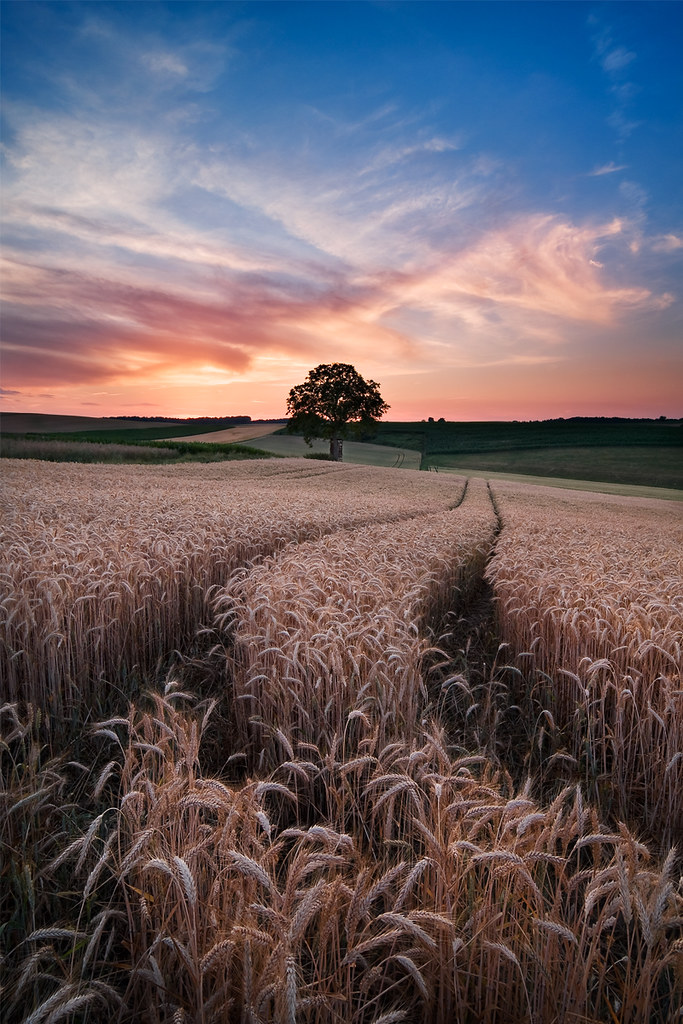
beautiful capture Michael
This is a discussion on My favourite shot of my favourite spot within the Show your photo (Color) - Landscape & Nature (flowers, mountains, storms etc.) forums, part of the Photography & Fine art photography category; beautiful capture Michael...
beautiful capture Michael
" A good photograph is one that communicates a fact, touches the heart and leaves the viewer a changed person for having seen it. " Irving Penn
" There are no rules for good photographs, there are only good photographs." - Ansel Adams
I hope I can do that one day.
Happy Shooting
Peter
Gorgeous shot for sure.I'd love to know a bit more about the post processing if you'd care to share.
Thx! Marko
- Please connect with me further
Photo tours of Montreal - Private photography courses
- Join the new Photography.ca Facebook page
- Follow me on Twitter http://twitter.com/markokulik
- Follow me on Google+ https://plus.google.com/u/0/111159185852360398018/posts
- Check out the photography podcast
"You have to milk the cow quite a lot, and get plenty of milk to get a little cheese." Henri Cartier-Bresson from The Decisive Moment.
Beautiful shot!
Thank you all!
@Marko: no problem, I'll do a short summary here
1. Shot consists of two manual focus settings one at the fg at around 1 meter and one around 3 meters -> that's from experience for my equipment what I know I get best sharpness over the whole dof from. For full format DSLRs one might need 3 focus shots for the best stacking. I used f/11 so no diffraction on my EOS40
2. At both settings I used bracketing of 3 exposures + I had inserted my Lee 0.6 GND filder together with a polarizer which already gives a very good single exposure here but I always want to have some room to play and brighten shadows or darken some highlights.
3. I get 6 Images and load them into layers in PS after I did removal of CA in Camera Raw + some presharpening
4. 3 layers are for the foreground (group) , 3 layers are for the background (group)
5. In both groups I activate the normal exposure and mask out the +2 and -2 exposure. Then with a soft brush I paint white in those masks to brighten some areas or darken others. No harsh adjustments here just with around 10% opacity to keep things natural, with repeated strokes I can build up the result
6. Then I blend both groups together to get the focusstacking. For such a scene a simple gradient mask is sufficient. In the 100% view you can check where the transition should be placed. with my settings it's somewhere in the lower half of the frame.
7. I have an Image which is sharp from front to back and has a perfect exposure -> make a smartobject of it
8. Now do your normal postprocessing work -> curves (a lot), selective color, saturation and in the end Sharpening for the web
please feel free to ask where something is not clear. This helps me to write it better.
cheers
Thanks so much for that detailed explanation
What i was really curious about though is #8
"8. Now do your normal postprocessing work -> curves (a lot), selective color, saturation and in the end Sharpening for the web"
Gotcha!
many thx!
marko
- Please connect with me further
Photo tours of Montreal - Private photography courses
- Join the new Photography.ca Facebook page
- Follow me on Twitter http://twitter.com/markokulik
- Follow me on Google+ https://plus.google.com/u/0/111159185852360398018/posts
- Check out the photography podcast
"You have to milk the cow quite a lot, and get plenty of milk to get a little cheese." Henri Cartier-Bresson from The Decisive Moment.
Bookmarks